A Definitive Guide to Motorised Two Wheelers

Designing Rider Interfaces for Usability and Safety (HMI)

A A

What HMI entails

In the high-stakes environment of two-wheeler design, the Human-Machine Interface (HMI) is the vital handshake between the rider and the vehicle’s internal logic. While the term HMI technically covers every physical touchpoint, in the modern engineering landscape, it has become synonymous with the Instrument Cluster. This is the primary portal through which a vehicle communicates its status, and a rider manages their journey.

Designing an HMI is an exercise in cognitive ergonomics. Whether it is a high-utility scooter or a performance motorcycle, the rider is operating in an open, unshielded environment. They must balance the vehicle, scan for hazards while keeping an eye on the road at all times, and manage physical inputs simultaneously to actually ride the vehicle. A well-designed HMI acts as an intuitive extension of the rider’s senses; a poorly designed one becomes a dangerous drain on their limited "cognitive budget."
The HMI Philosophy: The Cluster as a Handshake

The fundamental role of the HMI is to translate raw sensor data into a visual language that can be understood in an instant. The ultimate metric for success is "Glance Value"—the ability of the rider to extract the information they need in mili-seconds. If a rider must squint or stare at a screen to find their speed or fuel level, the HMI has failed its safety mandate.
In the high-stakes environment of two-wheeler design, the Human-Machine Interface (HMI) is the vital handshake between the rider and the vehicle’s internal logic. While the term HMI technically covers every physical touchpoint, in the modern engineering landscape, it has become synonymous with the Instrument Cluster. This is the primary portal through which a vehicle communicates its status, and a rider manages their journey.

Designing an HMI is an exercise in cognitive ergonomics. Whether it is a high-utility scooter or a performance motorcycle, the rider is operating in an open, unshielded environment. They must balance the vehicle, scan for hazards while keeping an eye on the road at all times, and manage physical inputs simultaneously to actually ride the vehicle. A well-designed HMI acts as an intuitive extension of the rider’s senses; a poorly designed one becomes a dangerous drain on their limited "cognitive budget."

Data Synthesis: Utility, Safety, and the Hierarchy of Information

Before going into pixels or hardware, we must define the data itself. The HMI manages three distinct categories of information:


1. Mission-Critical Safety Data:
This includes ON/OFF states, Indicators, Side-stand, speed, braking status (ABS), and malfunction indicators (MIL). These must be visible at all times, regardless of the screen mode. These are also referred to as ‘Telltales’.
2. Operational Utility Data:
Fuel level, engine temperature, gear position, and trip meters. These provide the context for the ride precision, and control, making the bikes suitable for high-speed and track use.
3. Lifestyle & Connectivity Data:
Navigation prompts, caller ID, and music controls.

The usability aspect of HMI design hinges on Dynamic Filtering. A rider does not need to see their average fuel economy while leaning into a corner, nor do they need music metadata when the engine is overheating. Safety is maintained by ensuring that critical alerts (like low oil pressure) always override non-essential utility data, preventing the rider from being overwhelmed by a "wall of info."

HMI Typologies: From Segments to Smart Cockpits

The choice of display technology is a strategic decision that balances cost, complexity, and the intended use case of the vehicle.

Segmented LCDs

These are the most universally found on high-utility scooters or even some premium motorcycles. Such displays comprise a collection of small elements called Segments, physically created on the display unit that have an on or off state. Together such segments create what we perceive as shapes, letters or numbers. Using these pre-defined segments offer incredible sunlight legibility and low power consumption. However, they are rigid; they cannot be software-updated to show a new map or a different font.
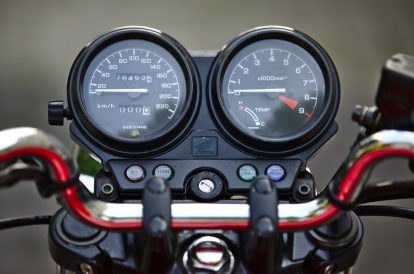
Fully Analog display cluster

This type uses a physical needle driven by a stepper motor or cable to indicate values against a printed scale. Its primary strength lies in Spatial Recognition; a rider can gauge their speed or RPM through peripheral vision based on the needle’s angle, without ever needing to read the actual numbers or focus their eyes directly on the dial.
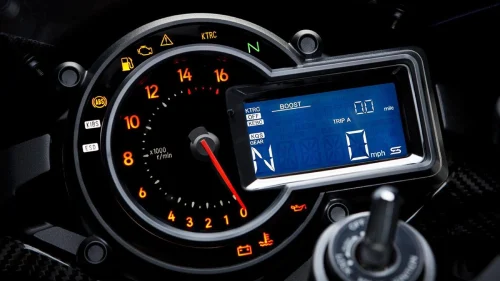
Hybrid Displays

Often seen on premium commuters, these combine a physical analog needle with a digital window. This provides the best of both worlds: the high-speed spatial processing of an analog needle for RPM or Speed, and a digital space for trip data and clock or other forms of data like turn-by turn navigation which is difficult to be represented on a dial.
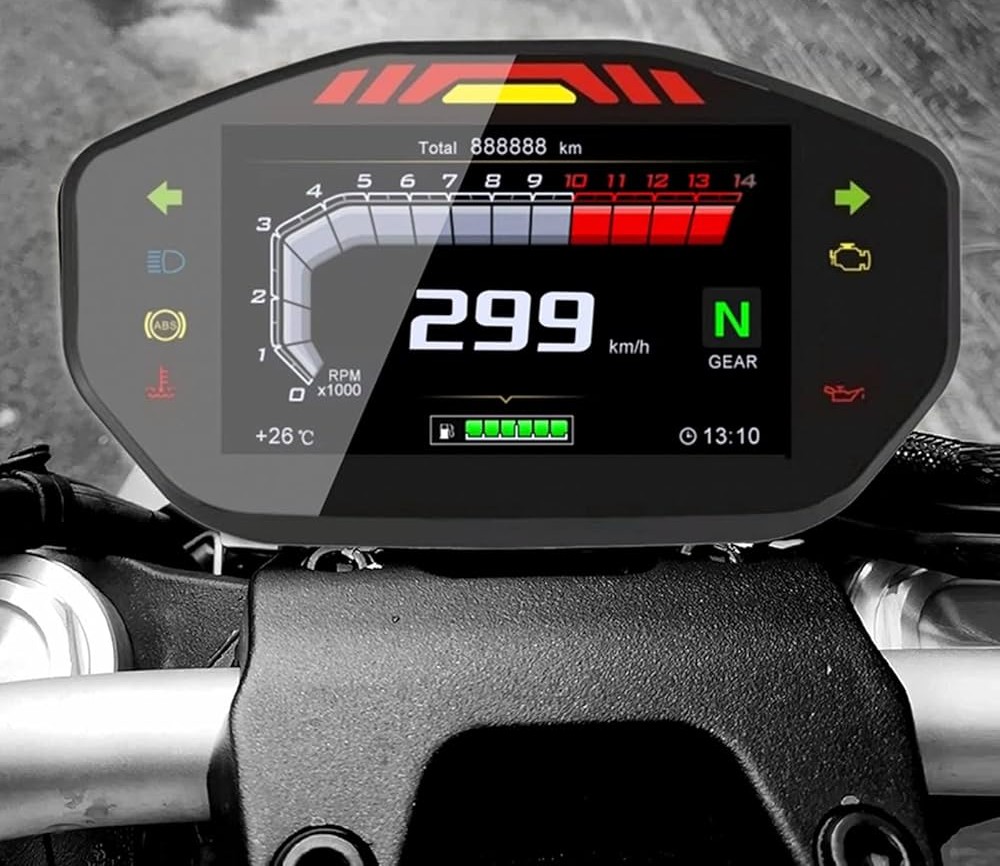
Full-Color LCD/LED screen

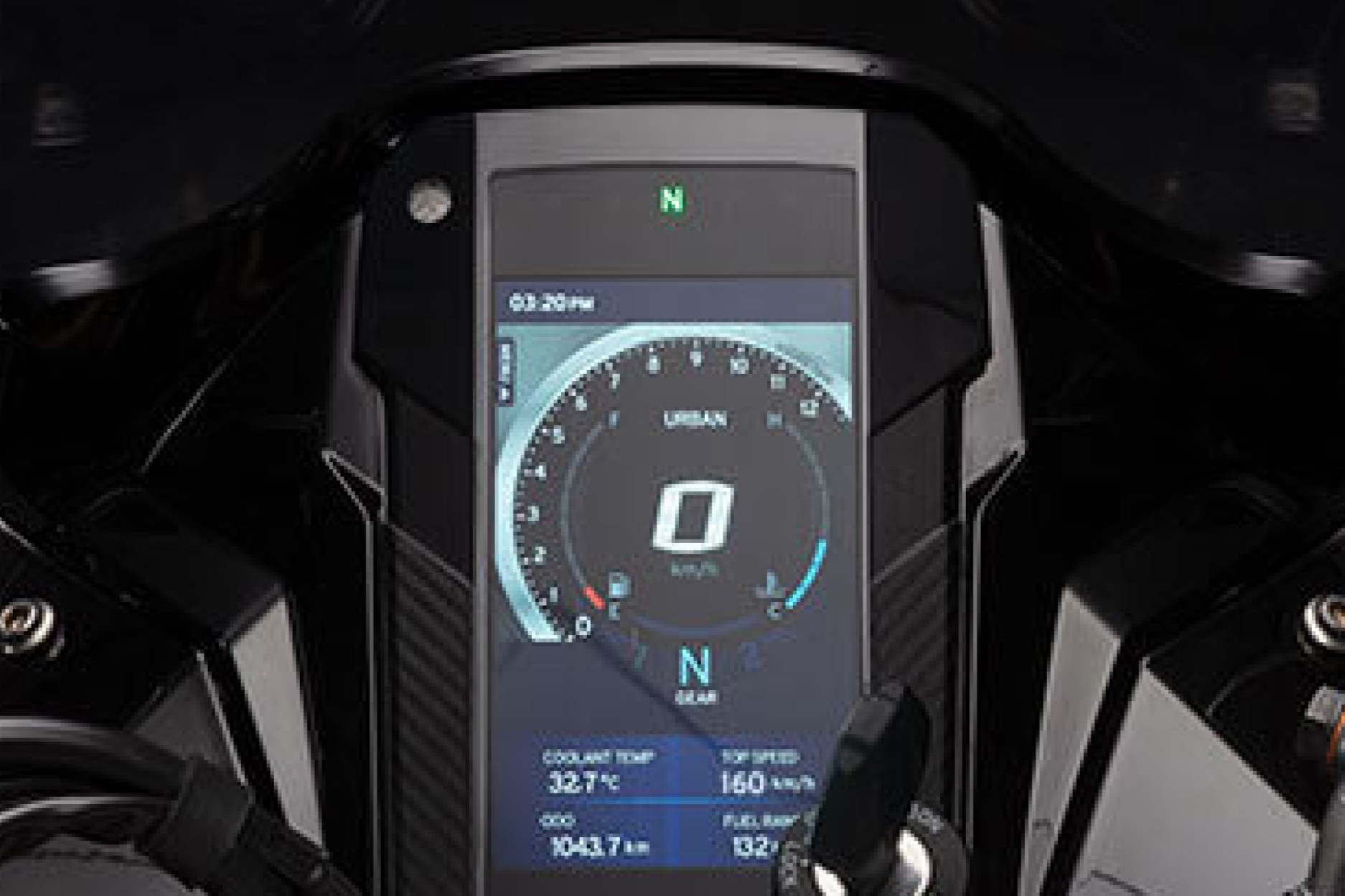
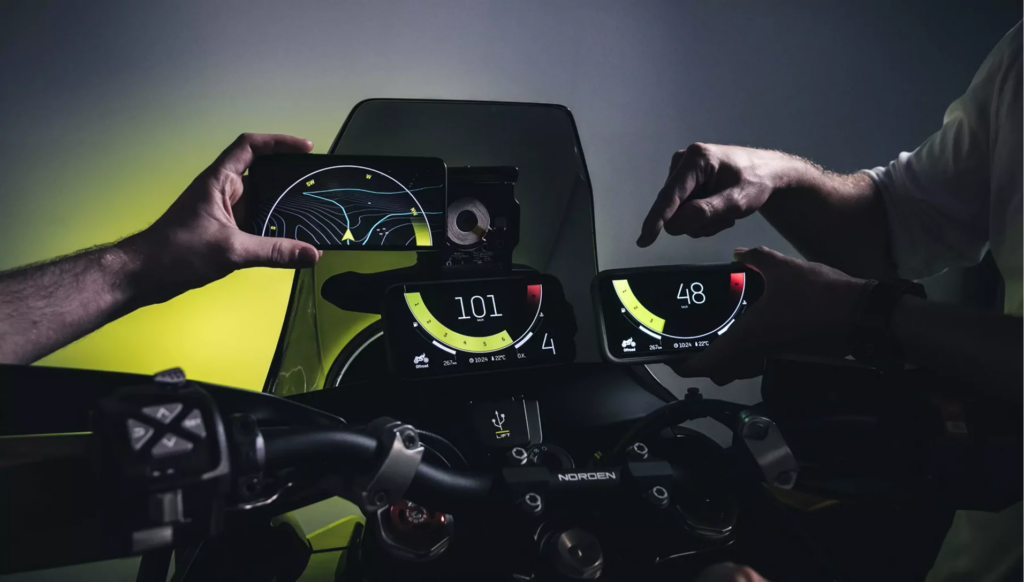
The norm today on all modern "Smart Cockpits." These are 100% software-driven, allowing for rich 3D graphics and complex data like media, calls or maps. They offer the highest "Performance" but sometimes come with increased "Complexity" in thermal management and cost.
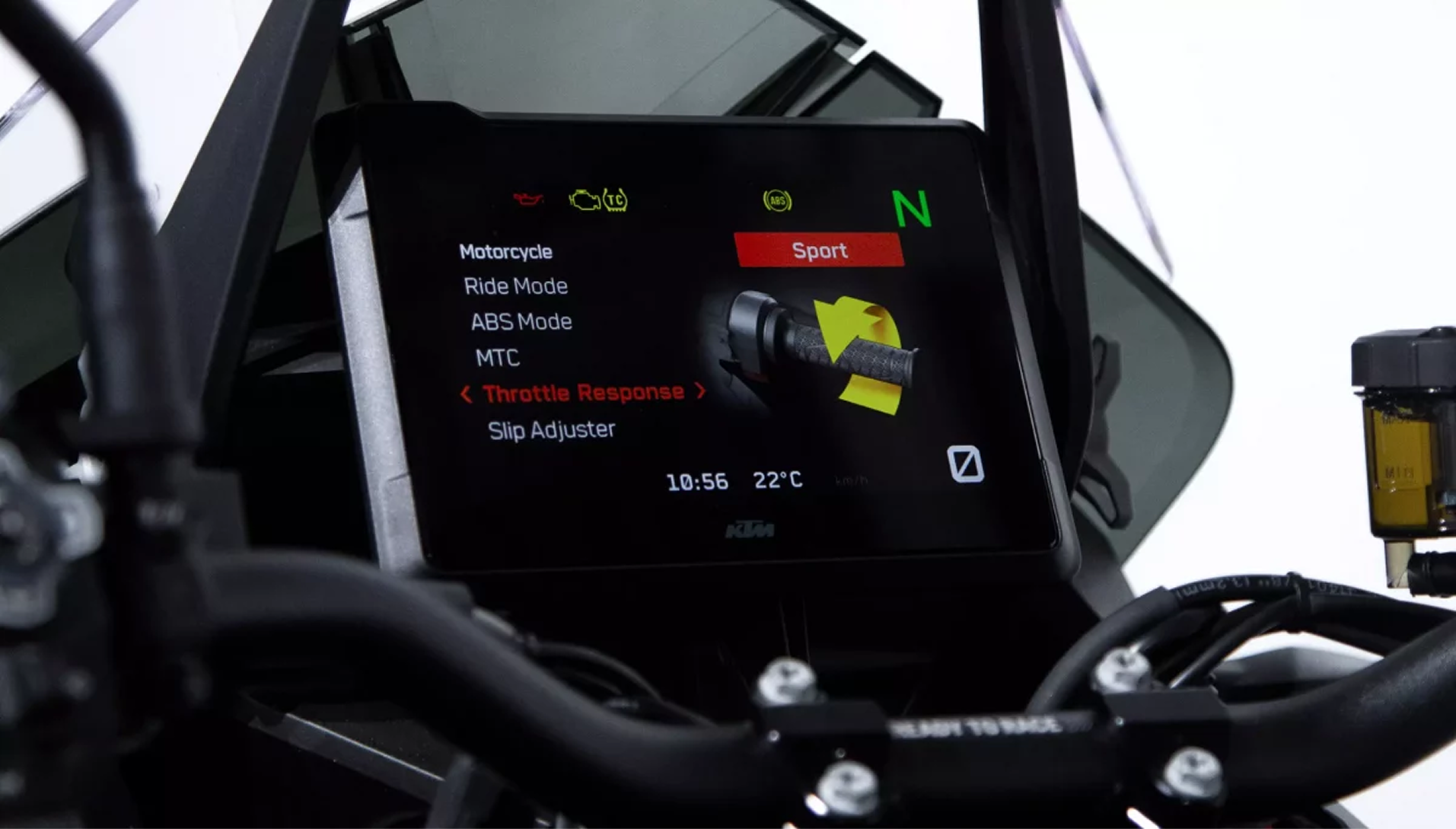
The Daily Digital Commute: Navigation and Connectivity

Modern life is connected, and the two-wheeler commute is no exception. Historically, riders used dangerous, vibrating handlebar phone mounts to navigate. Today, the HMI is absorbing these tasks.
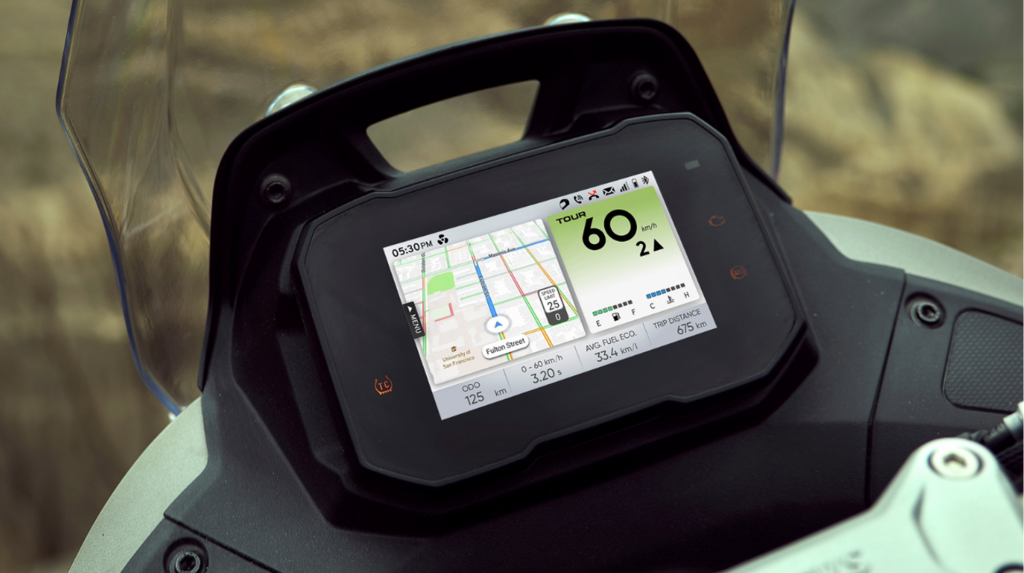
The trend is moving toward Turn-by-Turn (TBT) Navigation and Smartphone Mirroring. By integrating maps directly into the cluster, we control the rider’s focus. The usability challenge here is providing "Just-in-Time" information. Rather than showing a full, complex map that distracts the eyes, modern HMIs show a simple arrow and distance count only when a turn is approaching. This reduces the cognitive load of commuting while keeping the rider’s digital life safely integrated.
In many modern vehicles, the display transforms depending on the state or nature of the ride. For example, when navigation is ON, it comes to the forefront while other information become slightly secondary.

Tactile Feedback and the Confirmation Loop

An HMI is only as effective as the physical controls used to navigate it. On a two-wheeler, touchscreens are largely avoided because riders wear gloves and operate in the rain. This creates a mandatory synergy between the UI and the handlebar switchgear.
The "Tactile Signature"—the mechanical "click" and resistance of the buttons—provides the physical confirmation that a command has been registered. This closes the "Confirmation Loop." If a rider toggles a menu, they should feel the click in their thumb and see an instantaneous visual response on the screen. This prevents the "verification stare," where a rider looks at the screen for several seconds to see if their input actually worked.

This is where a design and development team must define the difference between which actions are to be done on the HMI itself (touch) and where the HMI is used primarily as the medium of conveying information. In most cases, this is a balance between the vehicle’s features, cost and the available hardware itself. One must also be aware of compliances or regulations on what is allowed on a vehicle during riding and what is allowed only when the vehicle is stationary. For example rules on receiving calls on the go or typing while the vehicle is moving.

Anthropometry and the Visual "Golden Triangle"

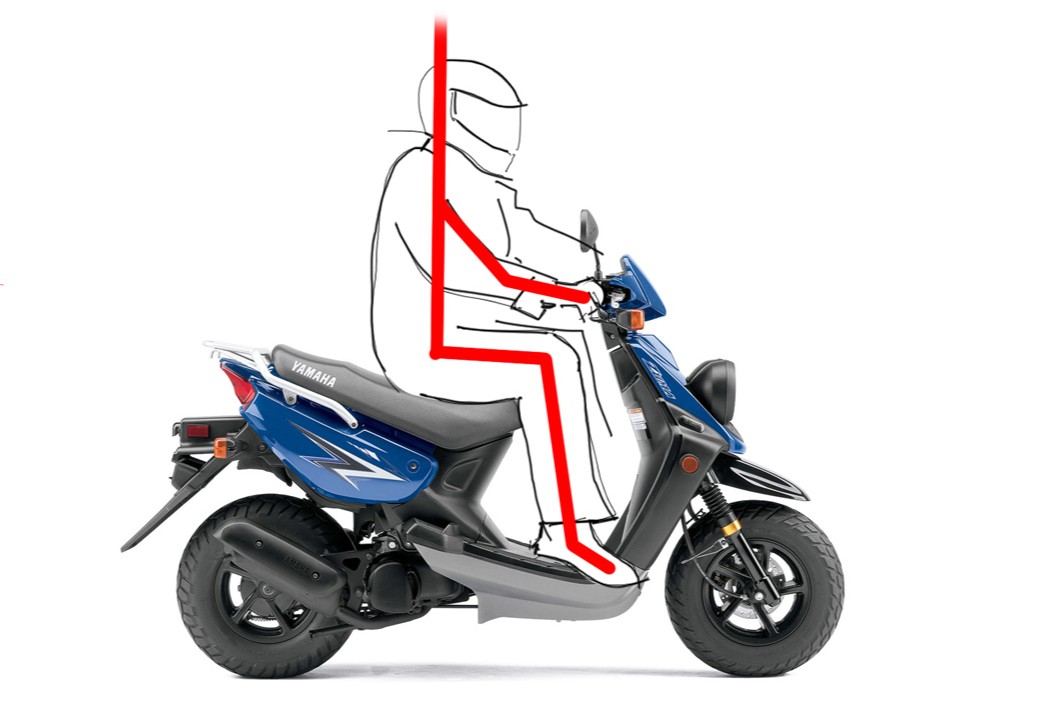
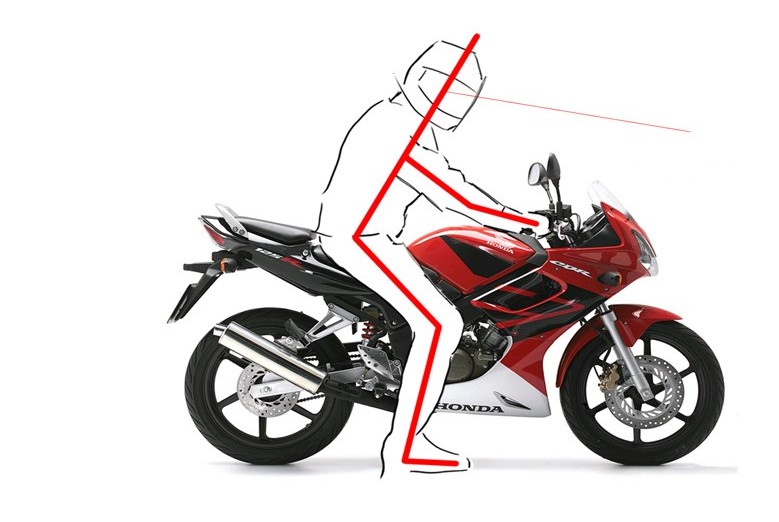
The "Golden Triangle" in HMI design refers to the visual relationship between the rider’s eyes, the instrument cluster, and the road horizon. The objective is to keep the display within a specific "cone of vision" to minimize the time the rider's eyes spend away from the traffic.

Designing a display is an exercise in physical geometry. Anthropometry (the study of human dimensions) dictates the cluster's placement. We must design for the "Universal Rider," ensuring clarity and comfort of use for a 5th percentile female rider who is between 4’9’’ to 4’10’’ in height and a 95th percentile male who is between 5’9’’ to 5’10’’ in height, on a two wheeler. (Heights mentioned are based on data for India)

The goal is to place the display within the rider’s peripheral vision, creating a "Golden Triangle" between the road, the rider’s eyes, and the HMI. On a scooter, the upright posture means the cluster is often lower and more horizontal. On a motorcycle, it may be tilted more vertically. The transition from road-focus to cluster-focus should require only a flick of the eyes, never a movement of the neck, which can cause fatigue and loss of situational awareness.

elementor-placeholder-image

The Scooter Triangle: The Steep "V"

On a scooter, you sit in an upright, "chair-like" position with your head high and your torso vertical. Because the instrument cluster is usually embedded low in the handlebar apron (near your waist level), the triangle is tall and steep. To see the screen, you have to look sharply downward away from the road. To make this safer, engineers tilt the screen backward (like a laptop on a desk) so it faces your high eye-line directly, preventing the image from looking distorted or faint while you also look at the road comfortably.

The Motorcycle Triangle: The Flat Arrow

On a motorcycle, your posture is more dynamic; you lean forward, bringing your head lower and closer to the front of the bike. The cluster is usually mounted high up near the headlamp, almost directly in front of your face. This creates a short and flat triangle where the display sits very close to your natural line of sight for the road. Because you are already facing forward, the screen is mounted vertically (like a TV on a wall) to face you head-on, allowing you to absorb data with almost no head movement.

Color as a Functional Tool

In a high-quality HMI, color is a functional code, not an aesthetic one. Human biology reacts to specific colors faster than it processes text.
Green: Reserved for neutral states, On condition, turn signals, or "Eco-mode" feedback, good or positive range of an indication like battery full or efficiency.
Amber: Signals caution (low fuel, side-stand down, error).
Red: Triggers an instinctive urgency for critical failures (ABS error, Engine heat, hazzard lights on).

We also use color-shift logic. A fuel bar that turns from white to blinking red as it enters reserve allows the rider to gauge their status through Peripheral Color Perception without ever needing to read a number or a percentage.

Legibility Under Environmental Stress

Unlike a car’s dashboard, a two-wheeler cluster lives in the glare of the sun. "Solar Washout" is the ultimate enemy of legibility.
To combat this, we use high-brightness (high-nit) panels and Optical Bonding. By filling the air gap between the display panel and the outer glass with a clear resin, we eliminate internal reflections and prevent the "fogging" that occurs when moisture is trapped inside. While this increases the cost of manufacturing, the performance of being able to read your navigation while riding into the sun is a non-negotiable safety requirement.

The HMI is a sensitive electronic unit mounted on a vibrating, outdoor platform. This presents two major engineering challenges: IP Ratings and Vibration Isolation. Two-wheeler clusters must meet IP67 standards—completely dust-tight and capable of surviving heavy monsoons or high-pressure washes. Furthermore, the unit must be mounted using rubber dampeners. If the mounting is too rigid, high-frequency engine vibrations can cause "solder fatigue" or internal component failure. Designing the "bones" of the HMI housing is just as critical as designing the graphics.

Spatial Processing: Analog Cues in a Digital World

Despite the move to digital screens, the human brain still processes "Spatial Patterns" (the position of a needle) faster than digital digits. We can recognize that a "needle" is near the red zone much faster than we can read the number "9500 RPM."

Modern TFT clusters utilise "Digital-Analog" UI designs—circular arcs and bar graphs that simulate the spatial context of traditional gauges. Tapping into this primitive pattern recognition allows the rider to monitor the vehicle's state through peripheral vision, leaving their active focus available for navigating traffic. The onus lies on the designers and engineers to utilise modern technology where it is best suited and not for mere decorative purposes alone.

"Blind" Navigation and Menu Flattening

Usability dictates that a rider should develop muscle memory for the HMI. If a rider has to look at the screen to navigate four layers of sub-menus to change a setting, they are riding "blind" for several seconds.

The strategy is "Menu Flattening"—ensuring the most used features, like trip resets or navigation settings, are never more than two clicks away. In other words, the navigation is almost flat without layers. By using consistent navigation patterns (e.g., Up/Down to scroll, Center to enter), we allow for "blind" operation. Eventually, the rider navigates the HMI by feel, using the screen only for quick confirmation. The ideal flow of a rider action would be to navigate to the desired feature or action and then perhaps only get the confirmation on the HMI to close the loop. Sometimes auditory confirmation is just as good.

Environmental Intelligence: Night and Day Modes

A display that is perfectly visible at high noon can be blinding at midnight if left unchanged. This creates a safety risk by ruining the rider’s "night vision" and constricting their pupils.

The HMI must use ambient light sensors to automatically Invert the Palette. There are also options of using the processor’s clock to know that the light needs to be dimmed post 6:30pm for instance. In some vehicles, with advanced HMI display clusters, there exists a Night Mode, we use dark backgrounds and subdued colors without diminishing the effectiveness of the critical indicators. This adaptive intelligence ensures that the cluster remains a source of information without becoming a source of glare, maintaining safety across a 24-hour riding cycle.

Regulatory Compliance: Telltales and Standards

While we have creative freedom in UI, we are anchored by strict legal regulations like AIS 071 or ISO 2575. These standards govern the size, color, and shape of "Telltales" so that creative liberty does not unintentionally affect the rider safety and create symbols that are not uniform across vehicles.

These telltales often require dedicated hardware LEDs behind the screen. This ensures that even if the main digital display software crashes, the critical safety warnings remain visible. This redundancy is a mandatory fail-safe for global homologation and rider safety although we do find many modern vehicles having all symbols including telltales integrated within the display itself.

The Future of the Interface

The HMI has evolved from a simple "meter" into a sophisticated digital companion. As we look toward the future of electric and connected vehicles, the complexity along with the brilliance of new features will only increase. However, the core engineering principles remain the same: Glance Value, Cognitive Load management, and Environmental Resilience. By mastering the intersection of psychology, physics, and regulation, we ensure that every handshake between the rider and the machine is one of confidence, safety, and ease.

Previous Impact of IoT on Two Wheeler Usage and Services
Next Future Directions in Augmented and Digital Displays
Designing Rider Interfaces for Usability and Safety
Scroll to top